

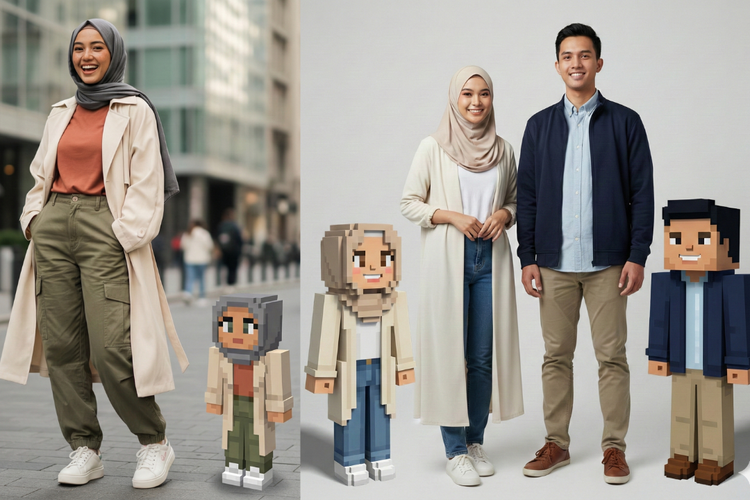
Tren mengubah foto menjadi karakter Minecraft sedang ramai dibicarakan di media sosial seperti Instagram. Banyak pengguna membagikan foto avatar Minecraft versi diri mereka dengan gaya kotak-kotak khas voxel. Hasilnya terlihat unik dan lucu, mirip dengan karakter dalam video game populer Minecraft. Menariknya, sekarang kamu tidak perlu menggunakan software 3D modelling untuk membuatnya. Cukup menggunakan Prompt Gemini AI yang telah disediakan.
Dengan fitur nano banana milik Gemini AI, edit foto ala Minecraft dapat dengan mudah diwujudkan. Namun, sebelum mencoba prompt, penting untuk memahami istilah yang sering muncul dalam desain karakter Minecraft, yaitu voxel. Voxel adalah singkatan dari volumetric pixel, yaitu bentuk pixel 3D yang memiliki tinggi, lebar, dan kedalaman. Jika pixel biasa hanya berbentuk kotak datar 2D, voxel adalah versi tiga dimensi yang terlihat seperti balok atau kubus kecil. Gaya voxel inilah yang membuat karakter Minecraft terlihat kotak-kotak, blocky, dan seperti tersusun dari balok Lego.
Berikut cara membuat karakter Minecraft menggunakan Prompt AI:
Langkah-langkah Membuat Karakter Minecraft Menggunakan Prompt AI
-
Siapkan foto terbaikmu
Gunakan foto full body dengan pencahayaan jelas, wajah terlihat, dan pakaian tidak menyatu dengan background. -
Unggah foto ke AI
Kamu bisa menggunakan Gemini AI, ChatGPT Image Editor, atau AI serupa. -
Tempelkan Prompt AI
Pilih prompt di bawah ini sesuai kebutuhan foto: solo, couple, atau keluarga.
Prompt Gemini AI untuk Bikin Karakter Minecraft
Untuk Foto Solo
“Transform the person in this image into a full-body Minecraft-style character (locked, pixelated, 3D voxel). Keep the same clothing colors, hairstyle, accessories, and overall appearance. Render the avatar as a transparent PNG, then remove its background. After generating the Minecraft avatar, place the avatar back into the original photo, standing next to the real person in the same environment. Adjust the avatar size so it looks like a small Minecraft character standing on the ground in the photo.”
Untuk Foto Berdua/Couple
“Transform the couple in this image into full-body Minecraft-style characters (locked, pixelated, 3D voxel). Keep their clothing colors, hairstyles, hijab details (if any), accessories, and physical traits accurate. Ensure each Minecraft avatar strongly resembles the real person by preserving facial features, skin tone, hair shape, smiles, and other distinctive characteristics. Render the avatar as a transparent PNG, then remove its background. After generating the Minecraft avatar, placed back into the original photo, standing next to the real couple in the same environment. Set each avatar’s size to approximately knee-height to thigh-height of the real humans (not tiny), and keep both avatars proportionally consistent with each other. Add natural shadow and proper ground alignment so the avatars blend realistically with the original scene.”
Untuk Foto Keluarga/Grup
“Transform all people in this image into full-body Minecraft-style characters (locked, pixelated, 3D voxel). Keep everyone’s clothing colors, hijab details, hairstyles, accessories, skin tones, and defining facial features accurate so every avatar still looks like the real person. Generate all Minecraft avatars with transparent backgrounds. Then place the avatars back into the original group photo, positioned near their real counterparts without overlapping. Set each avatar’s size to approximately 40% of each person’s real height (similar to knee–thigh height) to keep proportions consistent across the group. Ensure proper lighting, shadows, and ground contact so the avatars appear naturally integrated into the scene.”
Tips Agar Hasil Foto Ala Minecraft Lebih Maksimal
- Gunakan foto full body yang tidak terpotong.
- Kontras warna pakaian dan background harus jelas.
- Hindari rambut atau wajah tertutup tangan atau objek lain.
- Jika ingin tampilan kotak lebih besar, tambahkan: “increase voxel block size to extra large”.
- Jika ingin versi pose melambaikan tangan: “alternate version waving pose”.
Teknologi AI sekarang membuka banyak kemungkinan ide kreatif, termasuk membuat avatar Minecraft personal tanpa perlu keahlian desain. Hasilnya bisa dipakai untuk konten media sosial, hadiah personal, hingga merchandise digital. Tertarik mencoba?